
@xfloor-memory-sdk
  1. Get Started
@xfloor-memory-sdk
  • Get Started
    • Overview
    • Quick Start
    • Authentication and Identification
    • Core Concepts (5-Minute Read)
    • What to Use First (API Map)
  • SDK
    • Overview
    • SDK Installation & Setup
    • Python SDK
    • JavaScript SDK
    • Typescript SDK
    • Java SDK
    • FAQ & Troubleshooting
    • Copy-Paste Debug Checklists
  • Core FloorMemory
    • Query (Primary API)
      POST
    • Create Event (Post Content)
      POST
    • Recent Events
      GET
    • Basic information of a floor
      GET
  • Floor Management
    • Edit floor
      POST
    • Make floor Private
      POST
    • Make floor public
      POST
    • Rename floor
      POST
  • Registration
    • Sign Up
      POST
    • Sign In with email ID
      POST
    • Sign In with Mobile number
      POST
    • Validation
      POST
    • Change Password
      POST
    • Reset Password
      POST
    • Change email ID
      POST
    • Change Mobile number
      POST
    • Send Validation code
      POST
    • External User Registration
      POST
  • SDKs
  • Schemas
    • PostAdd
    • QueryResponse
    • Media
    • UserDetails
    • SignUpResponse
    • BlockDetails
    • FloorInfo
    • Threads
    • EventResponse
    • 400ErrorCode
    • Remaining
  1. Get Started

Quick Start

Quick Start โ€” Your First FloorMemory API Call (SDK-First)#

This guide shows how to make your first conversational, memory-aware query using FloorMemory APIs and SDKs.
You will:
1.
Create an App
2.
Generate an API token
3.
Install an SDK
4.
Ask a memory-grounded question in a Floor
โฑ๏ธ Time to first response: ~5 minutes

Step 1. Create an App#

An App represents your AI assistant and owns its API credentials.
An App is not a mobile application.
It is a logical configuration for your web-based Personal AI Assistant.
๐Ÿ‘‰ Create an App here:
https://xfloor.ai/account/settings/createapp
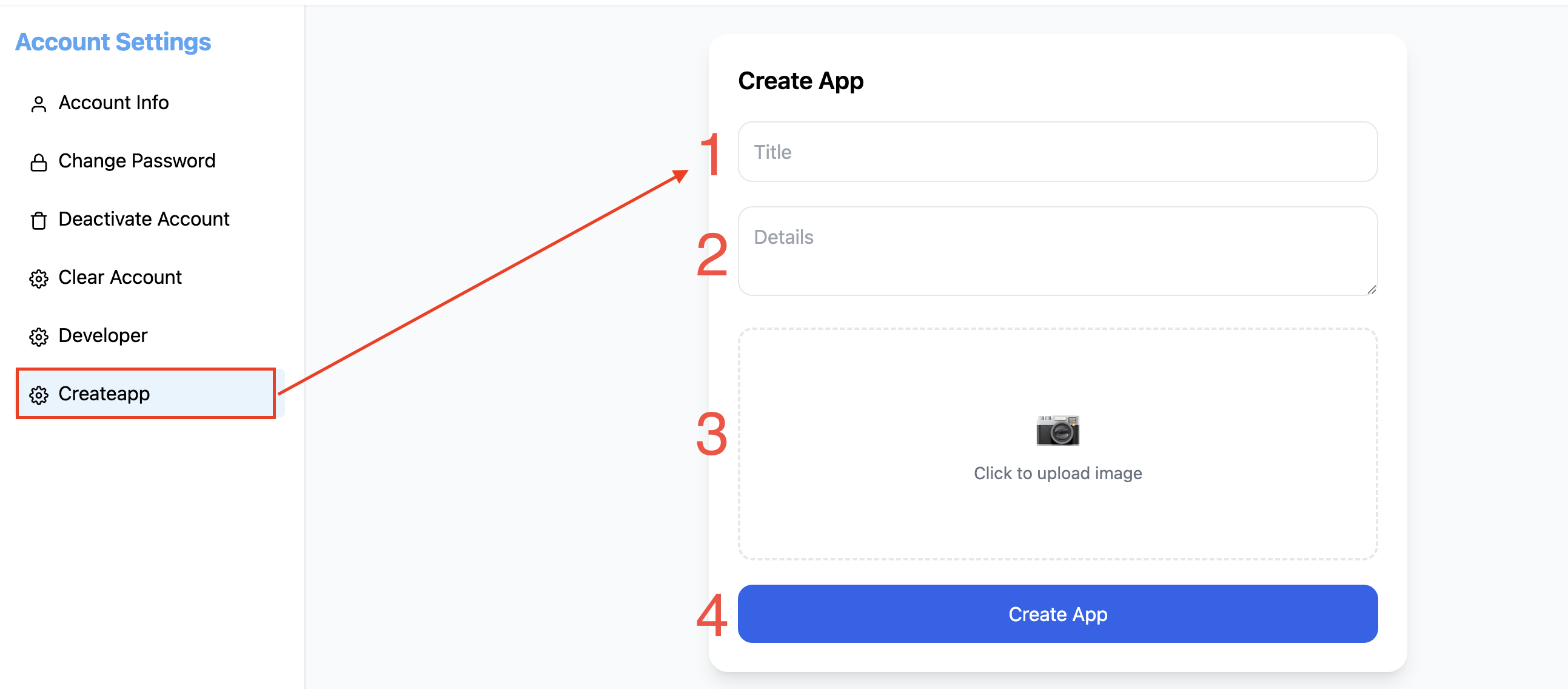
Create a new app
Fill in:
Title โ€“ Name of your assistant
Example: Personal Tutor, Research Assistant
Details โ€“ Short description
Example: AI assistant for algorithm revision
Image (Optional) โ€“ Dashboard identification only
Click Create App.
Once created:
The App becomes active
API access is enabled
A default Pod Floor is automatically created for the App
A default Block is automatically created inside that Floor
You can start adding content and querying immediately.

Step 2. Generate an API Token#

All FloorMemory API requests require Bearer Token authentication.
๐Ÿ‘‰ Generate a token here:
https://xfloor.ai/account/settings/developer
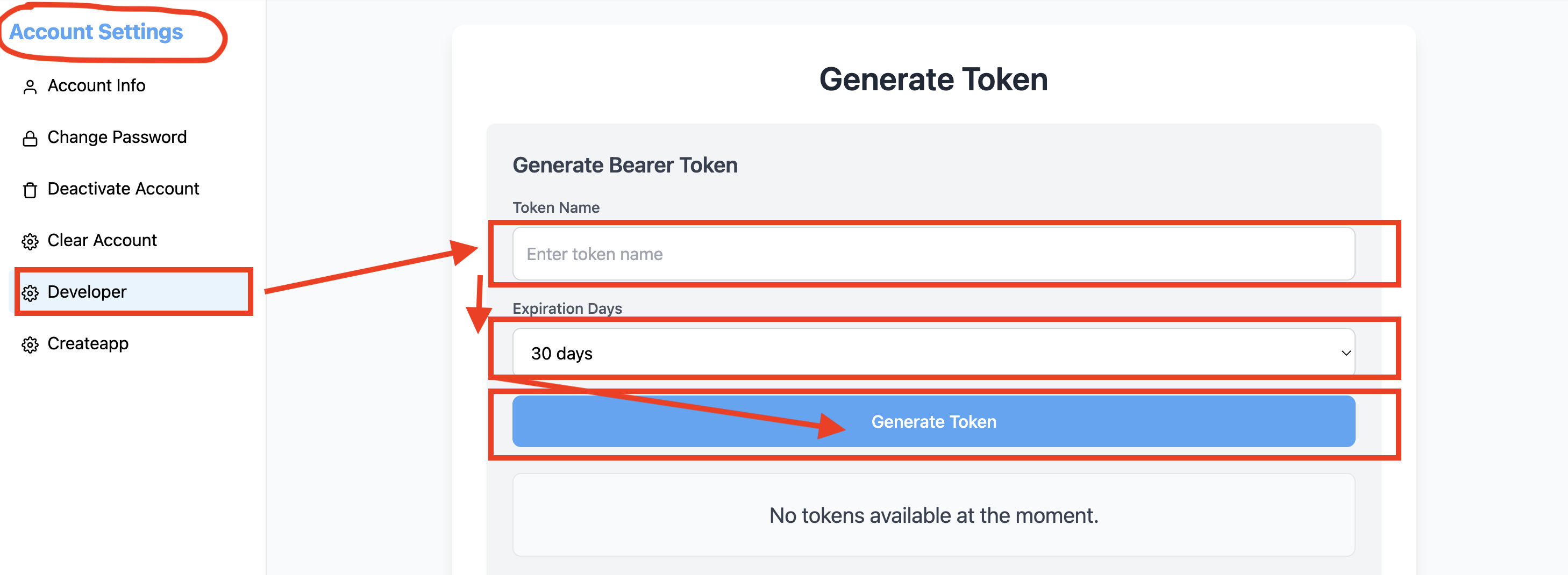
Generate Bearer Token screen
Steps:
1.
Enter a Token Name
Example: local-dev, production-backend
2.
Select Expiration Days
3.
Click Generate Token
4.
Copy the token immediately and store it securely
โš ๏ธ The token is shown only once
๐Ÿ”’ Keep it server-side โ€” never expose it in browser JavaScript
Set it as an environment variable:

Step 3. Install an SDK (Recommended)#

While you can call the APIs directly via REST, using an SDK is strongly recommended for:
Authentication handling
Typed request/response models
Automatic serialization
Cleaner application code
For SDK internals and supported languages, see:
๐Ÿ‘‰ SDK Overview

Python#

TypeScript / JavaScript#

SDKs for Python, TypeScript, JavaScript, and Java are generated from the same API contract and are functionally equivalent.

Step 4. Ask Your First Question (Query API)#

FloorMemory SDKs do not expose a single high-level MemoryClient.
Instead, functionality is accessed through capability-based API classes, such as QueryApi.
The Query API is the primary way to interact with FloorMemory.
It automatically:
Loads relevant conversation context
Retrieves floor- and block-grounded knowledge
Returns a grounded response
Stores conversation memory for future turns

Python Example (SDK)#


TypeScript Example (SDK)#

import { Configuration, QueryApi } from "@xfloor/floor-memory-sdk-ts";

const config = new Configuration({
  accessToken: process.env.XFLOOR_API_KEY!,
  basePath: "https://appfloor.in",
});

const queryApi = new QueryApi(config);

const response = await queryApi.query({
  userId: "user_123",
  floorId: "floor_456",
  appId: "YOUR_APP_ID",
  query: "Help me revise binary search trees",
});

console.log(response.answer);
๐ŸŽ‰ Thatโ€™s it.
Youโ€™ve made your first memory-aware conversational API call.

What Happens Automatically#

When you call the Query API, FloorMemory automatically:
Loads relevant conversation history
Retrieves knowledge scoped to the Floor
Stores the interaction as conversational memory
Maintains continuity across future queries
You do not need to manage:
Threads
Conversation state
Memory persistence

Notes on user_id, floor_id, and app_id#

user_id
Identifies the end user
(from your auth system or xFloor-managed registration)
floor_id
Identifies the knowledge space being queried
(the default Pod Floor is created automatically with the App)
app_id
Identifies the calling application context
(required for all SDK-based API calls)
All three are required for conversational APIs.

Next Steps#

Once your first query works, you can:
Add content using Create Event
Resume conversations using Get Conversations
Display activity using Get Feed
Secure flows using Signup / Login / Password APIs
Plug in your preferred AI model

Summary#

FloorMemory APIs provide the memory layer for AI assistants.
Bring your UI.
Bring your users (or use ours).
Bring your model.
FloorMemory handles the memory.
Modified atย 2026-01-29 09:55:43
Previous
Overview
Next
Authentication and Identification
Built with